8 Best Tower Fans with Remote (November 2026)
The best tower fans with remote controls include the DREO 28ft/s Tower Fan for shared living spaces, the Lasko 42-inch Tower Fan with Remote (T42951) for simple daily use, and the Honeywell QuietSet Whole Room Tower Fan (HYF290B) for light-sensitive sleepers.
On this page (7 sections)
- How we chose tower fans with remote controls
- The best tower fans with remote controls
- How should you choose a tower fan with a remote?
- How should you set up your remote tower fan?
- How do you keep the fan and remote working well?
- Which buying mistakes should you avoid?
- Which tower fan with remote should you choose?
The DREO 28ft/s Tower Fan, 9 Speeds is the best tower fan with remote for most buyers because it combines fine airflow control with useful sleep features and cleaning access. Choose the Lasko T42951 for simpler daily use or Levoit if you want automatic speed changes and vertical aiming.
The right remote fan should let you settle into a chair or bed and make the changes you need. Start with where the breeze must land, then compare controls, light settings and upkeep.
If you're still deciding on the shape, our guide to tower, pedestal, circulator and bladeless room fans explains the main differences. For more choices, see our best tower fans and tower fans for bedrooms.
Our picks at a glance
-
1

-
2
 Best for simple daily use
Lasko 42-inch Tower Fan with Remote (T42951)
8.8/10 our score
See it on Amazon -
3
 Best for light-sensitive sleepers
Honeywell QuietSet Whole Room Tower Fan (HYF290B)
8.2/10 our score
See it on Amazon
- 4
 Best for changing room temperaturesCheck it
- 5
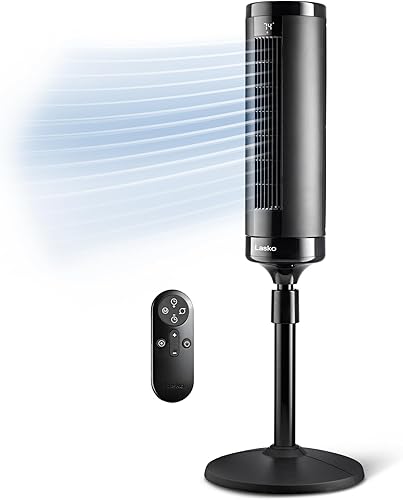 Check it
Lasko Elevation DC Tower Fan (EST100)
Best for higher beds - 6
 Check it
Pelonis Bladeless Tower Fan with Alexa
Best for smart-home users - 7
 Check it
Antarctic Star T42 Bladeless Tower Fan
Best for busy family rooms - 8
 Check it
Shark TurboBlade Bladeless Tower Fan
Best for wide seating areas
How we chose tower fans with remote controls
Useful remote controls and a good room fit drove these choices, followed by sleep settings and cleaning access. FancyFolder compared the controls and features that affect daily use, including timer length, airflow adjustment and handset storage.
The order favors models that suit a broad range of buyers before more specialized designs. A lower-ranked fan can still be the better choice when you need extra height, voice control or a horizontal breeze across several seats.
Airflow and sound figures need context. Brands may measure them under different conditions, so small differences between claimed numbers shouldn't outweigh a better control layout or a fan that directs air where you sit.
| Product | Best for | Speeds | Modes | Height | Our score |
|---|---|---|---|---|---|
| DREO 28ft/s Tower Fan, 9 Speeds | shared living spaces | 9 | Standard, Natural, Sleep, Turbo | 41.89 in | 9.0 |
| Lasko 42-inch Tower Fan with Remote (T42951) | simple daily use | 3 | 42.5 in | 8.8 | |
| Honeywell QuietSet Whole Room Tower Fan (HYF290B) | light-sensitive sleepers | 8 | 40 in | 8.2 | |
| Levoit 1472 CFM Tower Fan | changing room temperatures | 5 | 42.4 in | 7.6 | |
| Lasko Elevation DC Tower Fan (EST100) | higher beds | 8 | 42 to 54 in | 7.4 | |
| Pelonis Bladeless Tower Fan with Alexa | smart-home users | 6 | 40 in | 7.3 | |
| Antarctic Star T42 Bladeless Tower Fan | busy family rooms | 6 | Normal, Nature, Sleep, Smart | 42.13 in | 7.2 |
| Shark TurboBlade Bladeless Tower Fan | wide seating areas | 10 | 44.84 in | 7.0 |
The best tower fans with remote controls
DREO is the strongest all-around choice, while the other picks solve more specific needs. Use each recommendation's buy-or-skip advice to narrow the field before comparing smaller features.
DREO 28ft/s Tower Fan, 9 Speeds: Best for shared living spaces
- Remote control
- 9 speeds and 4 modes
- 90° oscillation
- 12-hour timer
Fine speed control suits rooms used for work, relaxing and sleep. A removable rear grille also makes routine dust removal easier.
Pros
- Wide choice of manual speeds
- Display dims automatically
- Removable rear grille
Cons
- No vertical angle adjustment specified
The DREO suits people who use the same room for work, relaxing and sleep. Its 9 speeds and 4 modes give you more control when a basic low setting feels too weak but the next step feels too strong.
Standard mode suits steady airflow, while Natural, Sleep and Turbo offer other patterns. The 90° swing is useful for nearby seats, and the 12-hour timer allows a shutoff later in the night or workday.
The display dims after 30 seconds, reducing control-panel light without a separate nightly step. DREO claims air speeds up to 28 ft/s, but its more useful advantage for many buyers is the range of lower settings.
Choose it if you expect frequent adjustments and want a removable rear grille for dust removal. Skip it if furniture blocks the breeze and you need a fan that tilts upward or stands much taller.
For nighttime priorities, see our guide to quiet fans for bedrooms. For an existing noisy fan, our advice on why a tower fan gets loud or rattles can help identify the cause.
Lasko 42-inch Tower Fan with Remote (T42951): Best for simple daily use
- Remote controls power, speed, oscillation, timer and nighttime setting
- 3 speeds
- 60° oscillation
- 7.5-hour timer
Choose this Lasko for a short set of controls and a nighttime setting that lowers speed and dims the LEDs. Its narrower sweep suits a defined seating area.
Pros
- Remote covers core functions
- Nighttime setting reduces speed and light
- Built-in carry handle
Cons
- Limited fine speed adjustment
- Remote batteries sold separately
The Lasko T42951 is the choice for someone who wants to press a button and get on with the day. Its remote handles power, speed, oscillation, timer and nighttime setting, without a long set of modes to learn.
Its 3 speeds make choices quick, and the 60° sweep fits a defined seating area. That narrower arc can keep the breeze focused around a sofa instead of spending much of each pass facing unused space.
The nighttime setting lowers speed and dims the LEDs. Use a manual speed instead if you want steady airflow while falling asleep and dislike a mode changing it for you.
Buy it for straightforward bedroom or living-room use, especially if you move the fan using its carry handle. Skip it if small speed changes matter, and have 2 AAA batteries ready because they aren't included with the remote.
Honeywell QuietSet Whole Room Tower Fan (HYF290B): Best for light-sensitive sleepers
- Remote stores on the rear housing
- 8 speed settings
- 8-hour auto shut-off timer
- 5 light-dimming options
Several light-dimming options suit bedrooms where control-panel brightness matters. Rear remote storage gives the handset a home when you move the fan.
Pros
- Several light-dimming choices
- Fine speed adjustment
- Remote storage on the housing
Cons
- Fixed height limits airflow placement
The Honeywell QuietSet suits a bedroom where both airflow strength and panel brightness need adjustment. Its 5 light-dimming options offer more control over the display than a single automatic dimming step.
You also get 8 speed settings, giving you room to choose a gentler breeze without immediately dropping to the lowest option. Set the speed from your usual sleeping position, since distance and bedding change how direct airflow feels.
The remote nests in the rear housing, which is helpful when carrying the fan or putting it away between seasons. At bedtime, leave it within reach rather than returning it behind a fan across the room.
Choose Honeywell for light control and fine speed choices in a fixed-height tower. Skip it if your main problem is getting air over a high mattress or aiming it above nearby furniture; those needs favor an adjustable design.
Levoit 1472 CFM Tower Fan: Best for changing room temperatures
- Remote control
- Temperature-responsive Auto mode
- 30° vertical adjustment
- 5 speeds and 4 modes
Automatic speed changes suit rooms that warm and cool through the day. Vertical adjustment helps aim the breeze toward your seat.
Pros
- Auto mode responds to room temperature
- Vertical airflow adjustment
- Sleep mode turns off display and control sounds
Cons
- Advanced Sleep mode starts oscillation after 1 hour
Levoit suits a room that warms during the afternoon and cools later. Auto mode adjusts speed with room temperature, reducing the need to reach for the remote whenever conditions change.
Its 30° vertical adjustment also helps when a fixed tower sends air below your preferred spot. Set the angle toward your seated position before using horizontal oscillation to share the breeze.
The important sleep detail is how Advanced Sleep behaves: the display and control sounds turn off after 5 seconds, and oscillation begins after 1 hour. Speed then follows room temperature as the mode progresses.
Choose Levoit if you want automatic adjustments and help aiming air higher or lower. Skip it if you want the fan to hold exactly the same speed and direction overnight, or use Normal mode instead of its automatic sleep routine.
Lasko Elevation DC Tower Fan (EST100): Best for higher beds
- Remote control
- Adjusts from 42 to 54 in
- 8 speeds and 4 wind modes
- 12-hour timer
The adjustable stand suits higher beds and seats where a shorter tower sends air too low. AirSense changes speed as room temperature changes.
Pros
- Height adjusts to suit furniture
- Remote covers modes and timer
- Temperature-responsive speed control
Cons
- Broad base needs clear floor space
- 13 lb weight adds effort when moving
The Lasko Elevation is the most direct fit here for a high bed or seating arrangement that needs a taller airflow source. Its stand adjusts from 42 to 54 in, letting you change the fan's position relative to furniture.
The remote covers power, speeds, modes and timer functions. AirSense adjusts speed as room temperature changes, while manual controls suit anyone who prefers a steady breeze during calls or sleep.
Lasko gives a low-speed sound claim of 24 dBA. Choose your likely operating speed first, since a low-speed figure doesn't describe the sound you'll hear when seeking stronger airflow.
Buy it when extra height solves a clear placement problem. Skip it for a tight walkway or frequent trips between floors: its base measures 14.62 in across, and the fan weighs 13 lb.
Pelonis Bladeless Tower Fan with Alexa: Best for smart-home users
- Alexa and Google Assistant compatibility
- 6 speed settings
- 120° oscillation
- 7-hour timer
App and voice controls suit buyers who already use a smart-home system. An included remote gives you a separate way to make adjustments.
Pros
- Alexa and Google Assistant compatibility
- App, remote and touch controls
- Wide oscillation arc
Cons
- Smart features add setup steps
- Shorter timer than several alternatives
The Pelonis suits people who already use Alexa or Google Assistant and want the fan included in that routine. Voice, app, remote and touch controls give you several ways to make changes.
Use the physical remote for quick adjustments from a seat, and set up the smart features if you want phone or voice access. You don't need to build your buying decision around an app you won't use.
Its 120° oscillation suits seating spread across a wider arc. For one chair, a fixed direction may be more comfortable than waiting for the breeze to return after each sweep.
Choose Pelonis when smart-home control is the main reason you're replacing a basic fan. Skip it if you prefer minimal setup or need a timer that covers a longer overnight period; its shutoff timer runs up to 7 hours.
Antarctic Star T42 Bladeless Tower Fan: Best for busy family rooms
- Remote and touch controls
- 6 speeds and 4 modes
- 9-hour timer
- Child lock and automatic display dimming
A control lock helps prevent unwanted setting changes, while rear remote storage keeps the handset with the fan. The removable grille gives access for cleaning.
Pros
- Child lock for touch controls
- Remote storage slot
- Rear grille removes without tools
Cons
- Fixed tower offers fewer aiming options than pivoting designs
The Antarctic Star T42 suits a busy room where the fan gets moved, controls get touched and the remote needs a storage spot. Its child lock helps prevent unwanted changes through the touch panel.
A hidden carry handle and rear handset slot keep the fan and remote together during moves. Once it's in place, keep the handset near your seat so the storage feature doesn't defeat the reason for having remote control.
The display dims after 30 seconds, and the rear grille removes without tools for cleaning. Those features suit a fan used in shared space by day and a bedroom later.
Choose it for practical storage, control locking and cleaning access. Skip it if you need a taller or vertically adjustable airflow path, and remember that a control lock doesn't secure the fan against tipping or make cords safe to play with.
Shark TurboBlade Bladeless Tower Fan: Best for wide seating areas
- Remote control
- 10 speeds
- Up to 180° oscillation
- Vertical and horizontal configurations
Pivoting sections and twistable vents suit seating spread across a room. Its horizontal configuration needs more side clearance than a slim upright tower.
Pros
- Several ways to direct airflow
- Wide oscillation range
- Wipe-clean bladeless design
Cons
- 15 lb weight makes frequent moves less appealing
- Horizontal configuration needs clear space
The Shark TurboBlade suits a wide seating area where a single upright stream is hard to aim. It pivots between vertical Tower Mode and horizontal Air Blanket Mode, with twistable vents for directing air in different directions.
Up to 180° oscillation adds another way to cover spread-out seats. Start with the vents aimed at the occupied areas, then decide whether sweeping improves comfort or sends too much air toward empty space.
Its 10 speeds allow fine manual adjustment. Shark's wipe-clean design also appeals if you want accessible outer surfaces rather than a conventional narrow tower grille.
Choose it when direction and configuration matter more than easy carrying. Skip it for a narrow bedside gap or frequent room changes: the fan weighs 15 lb, and its horizontal shape needs clear space beside it.
How should you choose a tower fan with a remote?
Choose airflow placement first and controls second. A convenient handset won't solve a breeze blocked by your sofa, and extra modes won't help if the fan takes up the only clear walkway.
Which tower fan remote controls matter most?
Power, speed and oscillation are the core functions for a tower fan with remote control. Add timer and sleep-mode buttons to your must-have list if you want to make those changes after getting into bed.
Don't assume every handset duplicates every button on the fan. The Lasko T42951 and Elevation have clearly described remote functions, which makes them useful starting points if a particular control matters to you.
Storage matters most when the fan moves often. A housing slot keeps the remote with the appliance during a move, while a bedside tray or small dish works better when you need it within reach overnight.
How many speeds will you actually use?
Choose fewer speeds for quick decisions and more speeds for smaller comfort adjustments. More settings are most useful when you regularly find yourself caught between a breeze that's too weak and one that's too strong.
Manual speed and operating mode solve different problems. Speed sets airflow strength, while a mode may vary it over time or respond to temperature.
If changing airflow distracts you during work or sleep, start with a steady manual setting. Automatic modes are better suited to buyers who want the fan to respond without repeated input.
Should the fan sweep, tilt or stand taller?
Choose oscillation for people spread across a room, vertical adjustment for aiming higher or lower, and added height for airflow above furniture. These features solve different placement problems.
A wide sweep isn't automatically better for one person. If you sit at a desk, a narrower sweep or fixed direction can keep air on you more consistently.
Height alone also doesn't reveal where the strongest part of the breeze will land. Measure your bed or chair and picture the path between it and the fan, including armrests, tables and bedding.
For more help with placement and size, read our tower fan guide to height, speed and noise. Our tower fan vs pedestal fan guide helps if you need more freedom to aim airflow.
Is a tower fan with remote good for a bedroom?
A remote tower fan works well beside a bedroom seating or sleeping area when you can control light, sound and airflow from bed. Focus on the speed you'll actually use rather than the strongest setting.
Check what sleep mode changes before relying on it. Some routines lower speed, start oscillation or respond to temperature, while a timer simply schedules a shutoff.
For a steady breeze all night, manual mode may suit you better. Our best quiet fans for bedrooms guide covers more options focused on nighttime comfort.
How should you set up your remote tower fan?
Set the fan on a level, stable floor with a clear airflow path, then check the controls from your usual seat. Follow the manual for base assembly, cord routing and clearance around the appliance.
Assemble and position it before judging airflow
Secure the base fully before switching the fan on. A loose connection or uneven surface can cause movement and noise that a different speed setting won't solve.
Keep the intake and outlet clear of curtains, bedding and furniture. Leave room for the fan's moving sections to travel without catching fabric or hitting nearby objects.
Aim the fan toward your occupied spot first. Run it without oscillation, choose a comfortable speed, and then add sweeping only if it improves coverage.
Check the remote from where you'll use it
Install the correct battery and remove any battery-isolation tab if one is present. Keep the battery compartment secured and dispose of old batteries safely.
Try power, speed and the other supported functions from your bed or chair. If response is unreliable, move objects out of the control path and try a closer position before assuming the remote has failed.
Choose one regular storage place within reach. Putting the remote beside your phone or glasses makes it easier to find without switching on a room light.
Set a shutoff around your routine
Choose the timer based on when you want the fan to stop, rather than selecting its longest setting every time. A shorter period can suit falling asleep, while someone working through the evening may want several hours.
If the fan shuts off unexpectedly, check the timer before changing other settings. Likewise, check the active mode when speed or oscillation changes without a remote command.
How do you keep the fan and remote working well?
Unplug the fan before cleaning, and use only the access points and methods described in its manual. Regular dust removal keeps the intake clear and avoids a larger cleanup later.
Clean accessible parts without wetting the motor
Start with a soft cloth, soft brush or vacuum attachment on accessible dusty areas. Don't push tools through narrow openings or force a housing apart to reach internal parts.
On models with removable grilles, follow the removal steps carefully. Wash only parts approved for washing, keep water away from electrical sections, and let everything dry fully before reassembly.
The DREO and Antarctic Star offer rear-grille access, which is worth considering if dust buildup has made previous fans difficult to maintain. Our guide to cleaning a tower fan explains a practical care routine.
Keep track of the remote and changing behavior
Wipe the remote with a dry or lightly damp cloth, keeping moisture away from buttons and the battery compartment. Follow the manual's battery-storage advice before putting the fan away for a season.
If a new rattle appears, stop the fan and check its footing, base connections and nearby objects. Don't keep running an appliance with a damaged cord, burning smell or signs of overheating.
Which buying mistakes should you avoid?
Avoid choosing by maximum airflow, speed count or a quiet-sounding name alone. Those details matter only when they serve the way you plan to use the fan.
Don't treat a fan as an air conditioner. It moves room air and helps you feel cooler through airflow across your skin; it doesn't refrigerate the air or remove indoor heat by itself.
Don't compare sound claims as though every speed has the same noise level. Airflow strength, distance and the surface under the base all affect what you hear at your seat.
Don't buy extra height or a wide pivoting design without measuring its space. Include the full moving area and cord route, rather than checking only the upright body.
Don't choose smart controls simply because they're available. A basic remote may cover every adjustment you need, while app setup adds value mainly if phone or voice access fits your routine.
Which tower fan with remote should you choose?
Choose your tower fan with remote by the one problem your current setup doesn't solve. Fine speed control, airflow height, panel brightness and shared-seat coverage lead to different choices.
- Choose DREO for flexible manual control in a room used throughout the day.
- Choose Lasko T42951 for straightforward remote operation.
- Choose Honeywell when bedroom light adjustment matters most.
- Choose Levoit for temperature-responsive speed and vertical aiming.
- Choose Lasko Elevation when you need airflow higher above the floor.
- Choose Pelonis for an existing smart-home routine.
- Choose Antarctic Star for control locking, remote storage and cleaning access.
- Choose Shark for directing air across a wide seating area.
Before ordering, mark out the fan's space and confirm that air can reach you without furniture blocking it. Then read whether a fan actually cools a room to plan how you'll use it alongside ventilation or air conditioning.
Our top 3 picks at a glance
-
1
-
2
Best for simple daily use
Lasko 42-inch Tower Fan with Remote (T42951)
8.8/10 our score
See it on Amazon -
3
Best for light-sensitive sleepers
Honeywell QuietSet Whole Room Tower Fan (HYF290B)
8.2/10 our score
See it on Amazon
Frequently asked questions
What should you look for in a tower fan with a remote?
Start with remote access to power, speed and oscillation, then add timer and sleep controls if you need them. Match airflow height and direction to your chair or bed before comparing extra modes; remote storage is useful when you move the fan, while cleaning access matters for regular upkeep.
Can you use a tower fan remote from bed?
Yes, you can change supported settings from bed when the remote is within its operating range. Place the fan where furniture won't block the control path, then check each button from your pillow position; keep the handset on a bedside surface rather than loose among blankets.
Are more speed settings better?
More speeds help you find a comfortable step between a breeze that feels too weak and one that feels too strong; they don't measure maximum airflow or sound. Choose fewer speeds for quick decisions, or a wider range if you often adjust the fan while working, watching TV or sleeping.
Do tower fans with remotes need special batteries?
Battery type depends on the remote: the DREO includes a CR2032 lithium battery, while the Lasko T42951 needs 2 AAA batteries that aren't included. Use the type named in the manual and follow its replacement steps; keep loose batteries, especially coin cells, away from children and pets.


