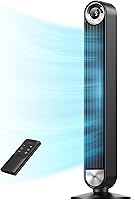
Why Is My Tower Fan Loud or Rattling?
A tower fan can be loud because of high airflow, dust buildup, loose exterior parts, or vibration against the floor. Unplug it before checking the base and air openings; stop using it if you notice burning smells, sparks, damage, or persistent grinding.
On this page (7 sections)
- Why is my tower fan loud or rattling?
- Could dust or a blockage cause fan noise?
- Why does a tower fan rattle when it oscillates?
- How should you choose a quieter replacement?
- Which of these tower fans suits your room?
- What should you check before using the fan again?
- What should you do about a loud or rattling tower fan?
A tower fan can be loud because of high airflow, dust buildup, loose exterior parts, or vibration against the floor. A steady rush of air that rises with speed is different from a new rattle, scrape, or grinding sound.
To work out why your tower fan is loud, start with when the sound happens. Noise at every speed, noise only during oscillation, and noise that appeared after moving the fan each point toward different checks.
Unplug the fan before moving, inspecting, or cleaning it. If there's smoke, sparking, a burning smell, unusual heat, or cord damage, stop using it instead of working through routine adjustments.
Why is my tower fan loud or rattling?
Airflow noise usually increases with speed, while a rattle can come from loose exterior parts, floor vibration, or contact with nearby objects. A sound that suddenly changes deserves more attention than a familiar, steady hum.
Use these clues to choose your next step:
- A smooth rushing sound at higher speeds: Try a lower fixed speed and aim the airflow toward your seat or bed.
- A buzz that began after moving the fan: Check the floor, base assembly, and nearby objects.
- A rattle only while turning: Check clearance around the fan and whether the base sits flat.
- Scraping, grinding, or repeated hard clicking: Stop using the fan and seek manufacturer guidance.
These clues help narrow the cause; they don't confirm an internal fault. Don't open the motor housing, bend internal parts, or add oil unless the manual specifically calls for it.
Does a loud tower fan need to be replaced?
Replace or repair a fan when safe exterior checks don't resolve an abnormal sound, rather than replacing it just because high speed is noisy. Moving it onto a level floor or cleaning permitted parts may solve a simple problem.
Check the manual and contact the manufacturer before buying another fan. Have the model number ready and describe whether the noise occurs at a fixed speed, during oscillation, or both.
Could dust or a blockage cause fan noise?
Dust can restrict airflow and contribute to noise, but cleaning won't fix every rattle. Look for lint around the intake and outlet, especially if airflow has weakened since the fan was last cleaned.
Unplug it, then use only the cleaning method allowed in its manual. Don't push tools through the grille, spray cleaner into the housing, or use compressed air unless the manufacturer approves it.
Washable parts must be removed only as instructed and must dry fully before reassembly. A removable grille doesn't mean the motor or the whole fan can be rinsed.
Our guide to how to clean a tower fan explains the care steps in more detail. Keeping air openings clear is more useful than waiting for a thick layer of dust to form.
Why does a tower fan rattle when it oscillates?
Oscillation can reveal an unstable base or contact with nearby objects. The fan needs clear space throughout its full turning range, including room for curtains that move in the breeze.
With the fan unplugged, check that the base sits flat and its accessible fasteners are secured according to the assembly instructions. Don't overtighten plastic parts or force the tower to turn by hand.
A thick rug or soft mat can let a tall fan rock. Use a firm, level surface rather than trying to silence it with folded towels, makeshift wedges, or extra padding.
If there are no warning signs and the fan stands securely, briefly compare operation with oscillation off and on. Stop if the rattle returns; turning off oscillation doesn't resolve a possible mechanical fault.
When should you stop using a noisy tower fan?
Stop immediately for smoke, sparks, a burning smell, unusual heat, or a damaged cord or plug. Persistent grinding or scraping also calls for manufacturer guidance before further use.
Unplug the fan only if you can do so safely. Don't tape a damaged cord or keep restarting a fan to see whether a warning sign disappears.
Check the model against the U.S. Consumer Product Safety Commission's recalls page.
Our guide explains how to check whether a fan has been recalled and find the identifying details you need.
How should you choose a quieter replacement?
Choose a fan that provides enough airflow at a comfortable lower speed, with controls that match how you use the room. Maximum wind speed matters less if you won't tolerate the sound needed to reach it.
Low noise claims need context. Brands may measure at different distances and settings, so a single decibel figure can't tell you which fan will sound quieter beside your bed.
For sleep, consider display shutoff, a timer, and the ability to hold a steady speed. Natural or automatic modes can change airflow over time, and those changes may be more noticeable than a constant sound.
Also check outlet height and floor space. A fan aimed into the side of a bed or sofa may tempt you to raise the speed when better placement would help more.
A tower fan moves air rather than refrigerating it. See whether a fan actually cools a room before choosing extra power to solve a room-temperature problem.
Which of these tower fans suits your room?
Choose the standard DREO for remote-controlled bedside use, the smart DREO for connected controls, or the Lasko for adjustable airflow height. Each solves a different placement or control problem.
DREO 90-Degree Oscillating Tower Fan: simple bedside controls
This DREO suits someone who wants remote adjustments and easier routine cleaning. It has 5 speeds, 4 modes, and washable grille and impeller parts, with cleaning access governed by its instructions.
DREO claims noise as low as 28 dB and airflow up to 26 ft/s. Those figures describe different performance limits, so don't expect maximum airflow at the lowest noise level.
Choose it if you want to adjust the breeze from bed without app controls. Skip it if voice control or a height-adjustable outlet is central to your setup; the other options address those needs.
DREO Smart Tower Fan 90-Degree, 26ft/s: connected bedroom control
The smart DREO suits a bedroom where voice control and display shutoff matter. It supports the DREO app, Alexa, and Google Home, alongside remote and touch controls.
Its Auto mode changes fan speed with room temperature. If changing airflow sounds draw your attention at night, use a fixed speed instead of assuming automatic control will be more restful.
Choose it if you'll use connected controls regularly. Skip it if you want only basic remote adjustments, since smart features don't by themselves make airflow quieter.
Lasko Elevation DC Tower Fan (EST100): higher airflow placement
The Lasko suits a tall bed, raised seating, or a room where a low outlet misses you. Its height adjusts from 42 to 54 inches, and it offers 8 speeds.
Lasko claims airflow up to 40 ft/s and noise as low as 24 dBA on low speed. Its 14.62-inch-wide base needs more floor space than either DREO here.
Choose it when outlet height is the main problem. Skip it for a tight bedside gap or frequent moves between rooms, where its 13-pound weight adds effort.
Compare more options in our guide to quiet fans for bedrooms. For help deciding whether this shape suits your space, see whether tower fans are good for a bedroom.
What should you check before using the fan again?
Restart only after the fan is stable, clear of nearby objects, fully reassembled, and free of visible damage. Any parts washed during cleaning must be completely dry.
For a fan without warning signs, use this sequence:
- Place it on a firm, level floor with clear intake and outlet space.
- Route the cord so it isn't pinched, stretched, or creating a trip hazard.
- Start at a low fixed speed with oscillation off.
- Listen before increasing speed or enabling oscillation.
- Stop if the abnormal sound returns.
Aim the airflow toward the area you occupy before raising the speed. Don't block the intake to soften the breeze, and don't place the fan on furniture to gain height.
What should you do about a loud or rattling tower fan?
If your tower fan is loud from airflow alone, adjust its position and speed before replacing it. If it rattles, inspect the base, clearance, and permitted cleaning areas while it's unplugged.
Choose the standard DREO for straightforward bedside controls, the smart DREO for app and voice use, or the Lasko when adjustable height solves an airflow problem. Leave a fan with persistent grinding, damage, or electrical warning signs off.
For help matching fan height, controls, and placement to your room, use our tower fan guide.
Frequently asked questions
Why is my tower fan rattling?
A tower fan may rattle because its base or an exterior panel is loose, or because it vibrates against the floor or a nearby object. Unplug it before checking accessible parts as the manual allows.
If the rattle remains after safe checks, stop using it and contact the manufacturer.
Is it safe to use a tower fan that rattles?
Check a new rattle before continuing to use the fan. Unplug it and inspect the base, exterior, cord, and plug for damage or loose parts.
Don't open the motor housing; stop using a fan that sparks, smells burnt, becomes unusually hot, or keeps grinding or scraping.
Can dust make a tower fan loud?
Dust can restrict airflow and contribute to noise, especially when it builds up around air openings. Unplug the fan and clean only the areas and removable parts its manual permits.
If scraping or rattling remains after cleaning, stop using it rather than assuming more cleaning will solve an internal problem.
Why does my tower fan get louder when it oscillates?
Oscillation can expose a base vibration or bring the fan into contact with a curtain, wall, or furniture. Unplug it before checking clearance and moving it to a firm, level surface.
If clicking, grinding, or rattling continues during oscillation, leave the fan off and contact the manufacturer for guidance.