DREO Pedestal Fan Review: Worth It? (November 2026)
The DREO 100ft Airflow Pedestal Fan is the DREO pedestal fan to choose for remote control, adjustable height and a set-by-hand vertical angle. Pick the smart DREO for app controls and automatic movement in both directions.
On this page (9 sections)
- Is the DREO pedestal fan a good fit?
- How does the smart DREO change daily use?
- When should you choose Levoit or Lasko instead?
- What do airflow numbers tell you about these fans?
- How should you choose a fan for your bed, desk or sofa?
- How should you set up a DREO pedestal fan?
- Which common fan mistakes should you avoid?
- How should you clean and care for a pedestal fan?
- Which DREO pedestal fan should you buy?
The DREO 100ft Airflow Pedestal Fan is the DREO pedestal fan to choose for a shared seating area, a bedside breeze or a workspace where you want remote control and adjustable height. Choose the smart DREO instead if you want the head to move upward and sideways automatically.
The main buying decision is manual aiming versus automatic movement. Levoit adds a useful bedtime routine, while Lasko offers a taller stand for rooms where airflow needs to clear furniture.
Is the DREO pedestal fan a good fit?
The main DREO suits people who want fine speed adjustment and a broad side-to-side sweep without needing phone controls. Set its vertical angle for your bed or chair, then use the remote for everyday changes.
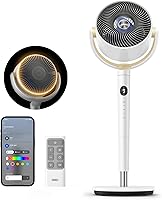
DREO 100ft Airflow Pedestal Fan: Best for shared seating areas
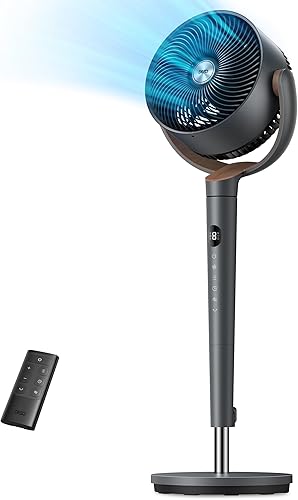
- 100 ft claimed airflow reach
- 120° horizontal oscillation
- 120° manual vertical tilt
- 9 speeds and 4 modes
Choose this pedestal circulator for a shared seating area where you can set the upward angle once and control the side-to-side sweep by remote.
Pros
- 9 speeds for adjusting the breeze
- Remote and panel controls
- Broad horizontal sweep
- Adjustable stand height
Cons
- Vertical tilt requires manual adjustment
- Height adjustment stops at 42 in
This model, the TurboPoly Fan 512, has 9 speeds and 4 modes. Its stand adjusts from 37 to 42 inches, with 120° horizontal oscillation and a separate 120° manual vertical tilt.
That combination works well when your usual seating position stays the same but more than one person wants a breeze. Aim the head at the right height first, then let the horizontal sweep share airflow across the sofa or desk area.
The brushless DC motor supports low-speed use, which DREO describes as quiet. An 8-hour timer lets you limit how long it runs without remembering to switch it off later.
Who should choose this DREO pedestal fan?
Choose this DREO if you'll set the upward angle once and mainly adjust speed or horizontal movement afterward. Its remote and panel controls suit a room where you don't need another app.
Skip it if you expect the head to sweep between floor level and higher parts of the room on its own. Also measure carefully if airflow must clear a tall bed, since the stand's upper limit may decide the purchase.
How does the smart DREO change daily use?
The smart DREO is the better choice for phone controls, voice commands and automatic movement in both directions. Those features matter most when you change settings often or use the fan from several positions in the room.
DREO Smart Pedestal Fan, 120 by 120 Degrees: Best for smart home users
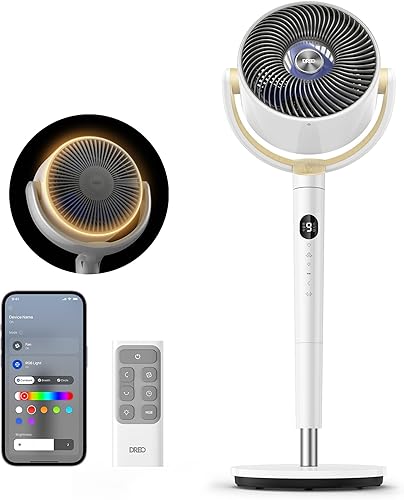
- App, remote and touch controls
- 9 speeds and 6 modes
- 120° horizontal and vertical oscillation
- Auto Mode
Choose the smart DREO when phone or voice control fits your routine and you want the head to sweep upward and sideways automatically.
Pros
- App and voice control
- Remote and touch controls
- Temperature-based Auto Mode
- Automatic movement in both directions
Cons
- Confirm the pedestal height range before ordering
- Extra modes take time to learn
The TurboPoly Fan 508S has 9 speeds and 6 modes, including an Auto Mode that responds to temperature changes. Its head can oscillate horizontally and vertically at the same time, with movement up to 120° in each direction.
That upward sweep is useful when you want circulation across different heights rather than a steady breeze aimed at one chair. For direct cooling while you read or work, a fixed direction may still feel more consistent.
The DREO app controls speeds, modes, oscillation, timers, Turbo mode and the RGB light. Remote and touch controls are also available, so you can choose the control method that fits the moment.
Choose this model if smart controls already fit your household routine. Skip it if you'll only use a fixed speed and direction, because the main DREO already covers that job.
Its pedestal is adjustable, but the 35.04-inch overall dimension isn't a full adjustment range. Confirm the minimum and maximum height before ordering if it must clear a particular desk or mattress.
When should you choose Levoit or Lasko instead?
Choose Levoit for its overnight settings or Lasko for taller airflow placement. Each solves a different problem from the smart DREO's extra control options.
Levoit 120-Degree Standing Fan: Best for bedtime routines
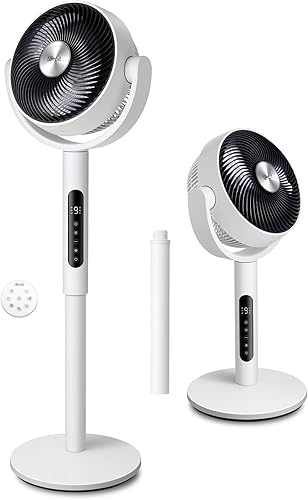
- 9 speeds
- Sleep and Eco modes
- 90° horizontal oscillation and 120° manual vertical tilt
- 20 dB minimum noise claim
Choose Levoit for a bedtime routine that turns off the display and selection sounds, then changes speed through the night.
Pros
- Sleep Mode turns off display and selection sounds
- Eco Mode responds to room temperature
- Remote and touchpad controls
- 9 speed settings
Cons
- Narrower horizontal sweep than either DREO
- Fan direction resets to default on power-up
The Levoit stands out for a Sleep Mode that turns off the display and selection sounds after 5 seconds. It lowers speed after an hour and then adjusts speed as room temperature changes through the night.
That routine suits a bedroom where light and control beeps are bothersome. Skip it if you prefer one unchanging speed all night, since a fixed manual setting is a better match for that preference.
Levoit states a minimum sound level of 20 dB, with high-speed operation at 42–46 dB. Choose your normal sleeping speed before judging suitability, since the minimum figure describes only the quietest end of its range.
Its 9 speeds, temperature-responsive Eco Mode and remote offer flexibility beyond bedtime. Horizontal oscillation is automatic through 90°, while vertical adjustment is manual through 120°.
The fan returns to its default direction when powered on. That makes it less convenient if you want it to resume pointing at one exact spot every time.
Lasko 20-inch Oscillating Pedestal Fan (S20620): Best for taller airflow placement

- 20 in blade length
- 4 speeds
- Adjustable height up to 56.9 in
- Remote and 7-hour timer
Choose Lasko when a taller stand matters more than fine speed steps or smart controls, and you have space for its larger head and base.
Pros
- Taller maximum height than the main DREO
- Remote with onboard storage
- 7-hour shutoff timer
- No tools required for assembly
Cons
- Fewer speed settings than the other picks
- Remote requires 2 AAA batteries, not included
The Lasko suits rooms where airflow needs to start higher, with an adjustable stand reaching 56.9 inches and a 20-inch fan head. Its tilt adjustment and optional oscillation let you choose between a fixed breeze and a sweep.
It has 4 speeds, a 7-hour shutoff timer and a remote with onboard storage. Assembly requires no tools, and you'll need 2 AAA batteries for the remote.
Allow room for its 20.25-inch depth and 22.5-inch width before choosing it for a crowded bedroom. Skip it if you want many small speed changes, since the other fans offer more steps.
Lasko's Blue Plug cuts current when it detects a hazardous fault. Keep following the operating instructions and inspect the cord during routine cleaning.
For more choices, see our best pedestal fans and best oscillating fans for living rooms. Our tower fan versus pedestal fan comparison helps if floor space or fan shape is still undecided.
What do airflow numbers tell you about these fans?
Use airflow capacity as a guide to air volume, then choose the head movement and placement that put that air where you need it. A higher number isn't a reason to accept an awkward fit beside your furniture.
| Fan | Airflow capacity | Main reason to choose it |
|---|---|---|
| DREO 100ft Airflow Pedestal Fan | 1,150 CFM | Shared airflow with remote control |
| DREO Smart Pedestal Fan, 120 by 120 Degrees | 1,000 CFM | Automatic movement and smart controls |
| Levoit 120-Degree Standing Fan | 908 CFM | A built-in bedtime routine |
| Lasko 20-inch Oscillating Pedestal Fan (S20620) | 2,191 CFM | A taller stand and larger head |
DREO claims airflow reach of up to 100 ft for both models. Use that as a reach claim, not a room-size recommendation: furniture, walls and the direction of the head affect the air's path.
A breeze aimed straight at one person can feel more useful than a broad sweep that only passes them briefly. For several people spread across a room, that same sweep becomes an advantage.
Fans help people feel cooler through moving air; they don't remove heat like an air conditioner. Our guide to air circulation and fan use explains how to choose between a personal breeze and room circulation.
How should you choose a fan for your bed, desk or sofa?
Choose by airflow path and daily routine before comparing extra modes. Measure the intended spot and decide where you want the center of the breeze to land.
For a bed, match the airflow to mattress height
A fan beside a bed needs a clear path over the mattress and bedding. If the bed blocks that path, moving the base farther away and tilting the head may work better than raising the stand alone.
For a shared bed, decide whether both people want direct air. A fixed angle aimed across the foot of the bed can be easier to live with than a sweep that repeatedly crosses one person's face.
For a desk, start with a fixed direction
A steady low breeze is a sensible starting point for one seated person. Oscillation can shift papers and give you alternating periods of stronger and weaker airflow.
Place the fan where the desk won't block its intake or outlet. Use height and tilt to aim toward your upper body rather than forcing air into the underside of the desktop.
For a sofa, check the whole sweep
Horizontal oscillation helps share air across several seats. Position the fan so its sweep covers the people using it instead of spending much of each cycle blowing toward an empty wall.
Think about who will change the settings, too. A remote is useful from the sofa; phone and voice controls earn their place when people already use those controls around the home.
If bedroom noise is your main concern, our quiet fans for bedrooms guide can help you compare the features that matter after lights-out.
How should you set up a DREO pedestal fan?
Assemble the fan according to its manual, then place it on a stable, level floor with a clear sweep. Secure the stand and head before switching it on.
Route the cord along a safe path where feet, chair legs and doors won't catch it. Keep curtains, loose fabric and other objects away from the grille and moving head.
Start at the lowest useful speed with oscillation off. Adjust distance, height and angle first, then raise the speed only if the breeze still feels too weak.
Turn on horizontal oscillation after finding a comfortable fixed position. Watch a full cycle to confirm the head clears furniture and sends air across the area you want.
On the smart DREO, try vertical oscillation separately before combining both directions. This makes it easier to see whether the upward movement improves circulation or carries the breeze away from you too often.
For use with air conditioning, aim the fan to help move cool air beyond the area near the vent. Keep the fan clear of the vent itself so it doesn't obstruct the system's airflow.
Which common fan mistakes should you avoid?
Avoid starting at maximum speed or choosing by reach alone. Good placement often solves a weak breeze without requiring a louder setting.
- Putting the fan behind furniture: a sofa back or desk can block the path before air reaches you.
- Using the widest sweep for one person: a narrower path or fixed direction keeps the breeze where it's useful.
- Assuming manual tilt is automatic: the main DREO and Levoit need their vertical angles set by hand.
- Choosing Auto Mode when you want a steady breeze: temperature-based changes can feel distracting if you prefer constant airflow.
- Leaving the fan running in an empty room for personal cooling: use a timer or switch it off when nobody needs the breeze.
Don't confuse a temperature sensor with air conditioning. Auto and Eco modes change fan speed; they don't give these fans a way to lower room temperature.
For help estimating running cost, how much electricity a fan uses explains why the fan's power use and your operating hours matter.
How should you clean and care for a pedestal fan?
Unplug the fan before cleaning, and follow the model's instructions for taking it apart. Remove only parts the manual identifies as removable.
Check the grille and blades for dust as part of your regular room cleaning. Dust buildup can restrict airflow, so clean sooner in rooms with visible lint or pet hair.
Use a soft brush or cloth where the instructions allow it. Wash removable parts only if permitted, and keep water away from the motor, cord connection and controls.
Let every cleaned part dry fully before reassembly. Refit the grille securely, then check that the fan stands firmly and the head moves freely.
If a rattle begins after cleaning or moving the fan, switch it off and check the assembly before continuing. Our guide to cleaning a pedestal fan gives a fuller routine.
Which DREO pedestal fan should you buy?
Choose the main DREO pedestal fan when one manually set vertical angle will serve your bed, desk or seating area. Choose the smart DREO when automatic upward movement and phone or voice control will be part of everyday use.
Pick Levoit if turning off display light and control sounds is central to your bedtime routine. Pick Lasko if the fan must sit higher to send air over furniture.
Before ordering, measure the floor space and the height of the obstruction the breeze must clear. Use our pedestal fan guide if those measurements point you toward a different stand or head size.
Frequently asked questions
Is the DREO pedestal fan worth considering?
The DREO pedestal fan is worth considering for adjustable airflow across a bed, desk or shared seating area. Choose the main model if remote control and manual tilt fit your routine, or the smart version if you want automatic vertical movement and phone or voice control.
What is the difference between the two DREO pedestal fans here?
The main difference is how you control airflow direction: the standard DREO needs manual vertical adjustment, while the smart model moves vertically and horizontally automatically. Both have remote controls, but the smart version adds app and voice control, more modes and temperature-based automatic speed changes.
Can a DREO pedestal fan cool a whole room?
A DREO pedestal fan can move air around a room and help people feel cooler, but it doesn't lower air temperature on its own. DREO claims up to 100 ft of airflow reach for both models; our guide to whether a fan cools a room explains how that differs from refrigeration.
How do you clean a DREO pedestal fan?
Unplug the fan, then follow its manual to remove only the parts intended for cleaning; keep moisture away from the motor and controls, and dry all cleaned parts before reassembly. Our pedestal fan cleaning guide explains the routine, while your model's manual determines which parts can be washed.